






MIT 822 Assignment 4

Copyright © 2024
What is augmented reality?
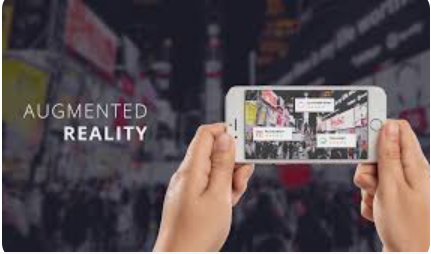
Augmented reality (AR) is a technology that overlays digital information – such as images, sounds, or data – onto the real world, enhancing the user’s perception of their environment. Indeed, “the primary goal of AR is to provide contextual information and enrich the user’s experience by augmenting physical reality with virtual elements” (Southern Methodist University, 2023). Unlike virtual reality, which immerses users in a completely digital environment, AR blends digital elements with the physical world. This is typically achieved through devices like smartphones, tablets, or AR glasses, which use cameras and sensors to recognize the surroundings and display relevant content.
AR can be used in education to provide interactive learning experiences, allowing students to visualize complex concepts by interacting with 3D models of objects.
Five AR Resources:
Merge Cube: This interactive tool allows students to hold a physical cube that, when viewed through a device, reveals 3D holograms. It can be used for various subjects, enabling students to explore anatomy, astronomy, and more by visualizing and manipulating 3D models.
QuiverVision: Quiver offers printable coloring pages that come to life with AR. Once colored, students can scan their creations with the app to see animations and educational content. This resource is excellent for engaging younger students in art and science lessons.
Google Expeditions: This platform provides virtual field trips and AR experiences that allow students to explore locations around the world or visualize complex concepts. Teachers can guide students through different environments, from the solar system to historical landmarks.
Zappar: Zappar allows users to create and interact with AR content easily. Educators can design custom AR experiences that can be triggered by images, objects, or QR codes, making it a versatile tool for enhancing lessons with interactive elements.
AR Flashcards: These educational flashcards use AR to bring letters and animals to life. When viewed through the app, each cards displays an animated 3D character, making it a fun and engaging way to teach vocabulary and basic concepts to early learners.
This tool:
Ourboox is a valuable tool for creating interactive digital books, particularly for educational purposes.
Pros:
Ourboox is designed to be simple and intuitive, making it easy for users of all ages to create digital books without needing extensive technical skills. Users can incorporate various media types, such as images, videos, and audio, enhancing the storytelling experience and making books more engaging. The platform supports collaborative projects, allowing multiple users to work together on a single book, which is great for group assignments (ISTE 2.4.c). Books created on Ourboox can be easily shared via social media or embedded on websites, making it easy for creators to reach a wider audience. The basic features of Ourboox are free, making it an accessible option for schools and individuals on a budget.
Cons:
While the platform is user-friendly, it may lack advanced customization options for users seeking more control over design elements. Users may encounter limitations on file sizes or the number of books they can create, which could be a drawback for extensive projects.
References:
Southern Methodist University (2023). Virtual Reality vs. Augmented Reality: A Comparative Analysis. SMU Meadows School of the Arts. https://www.smu.edu/meadows/newsandevents/news/2023/augmented-reality-vs-virtual-reality
International Society for Technology in Education (ISTE). (2024). ISTE standards: For educators. https://iste.org/standards/educators
Published: Oct 15, 2024
Latest Revision: Oct 15, 2024
Ourboox Unique Identifier: OB-1616736
Copyright © 2024

 Skip to content